
Search
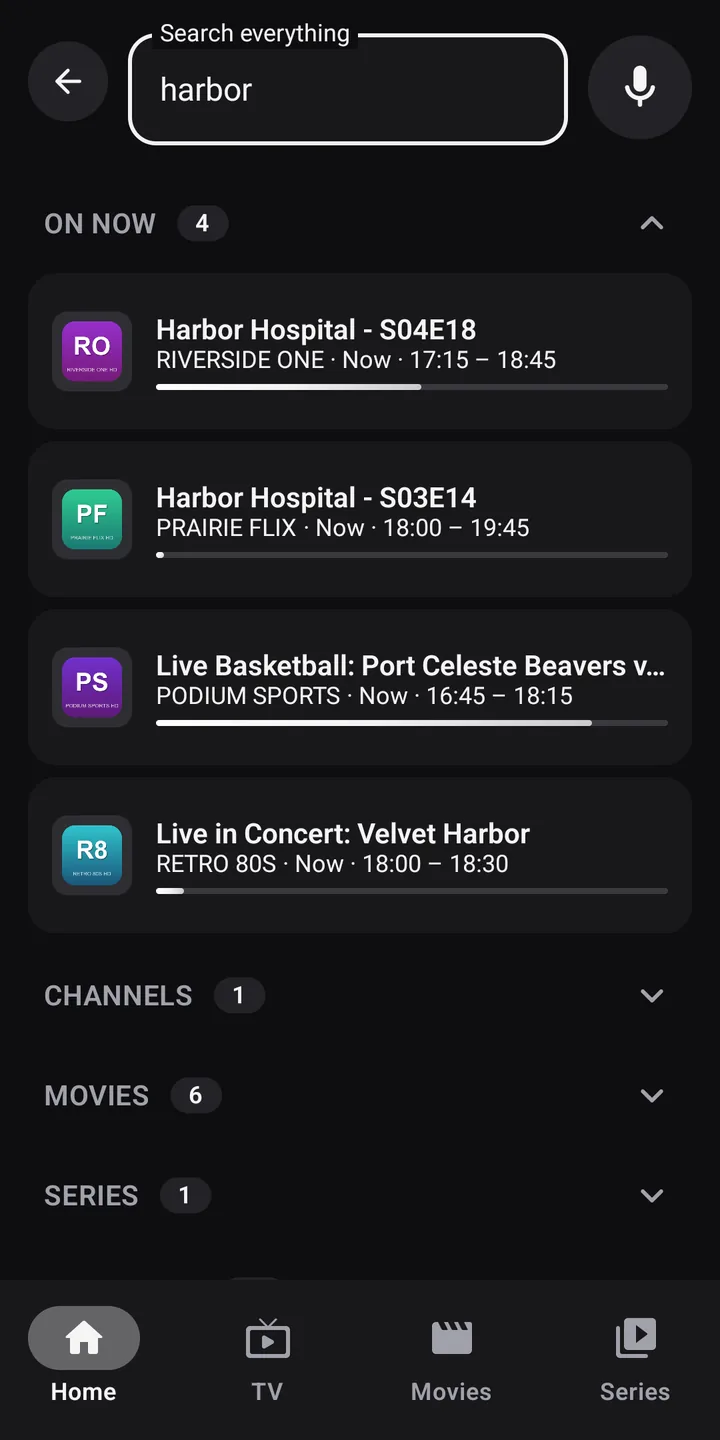
Search channels, movies, series and the TV guide all at once, by typing or by voice.
Open search
On phones and tablets
Tap the magnifying glass at the top of the home screen. In TV, Movies and Series, the search bar also filters the list on screen.
On TV, with the remote
Choose Search in the left menu, or press the microphone or search button on the remote: listening starts right away.
Type or speak
Type at least two letters in Search everything. Accents don’t matter: “cafe” finds “Café”.
To speak, tap the Voice search microphone to the left of the field. Zappia shows Listening…; what you say fills in Zappia’s search field, nothing else. On a TV, speak close to the remote’s microphone.
The results
Results are sorted into collapsible sections, each with its count:
| Section | When you tap a result |
|---|---|
| On now | The program details: watch live, from the beginning, record the rest |
| Channels | The channel opens full screen |
| Movies | The movie details |
| Series | The series details |
| Coming up | Record |
Programs that have already ended are never shown. Channels follow your profile’s country order; protected groups and hidden channels are left out.
If voice search doesn’t respond
- I didn’t catch that. Try again.: speak closer to the microphone, right after the beep.
- No connection for voice recognition.: the device’s voice service needs the Internet.
- Voice recognition is not responding.: check that the Google app (or the device’s voice service) is installed and up to date.